
buddylist
Download
Newv0.7.0: access levels and a faster phone app that opens offline

Run every coding agent side by side.

One desktop app for Claude Code, Codex, Gemini, OpenCode and Hermes. Parallel worktrees, group chats where agents review each other, and the diff, pull request and checks in one place.

Free for Mac, Windows and Linux. Your agents keep their own sign-ins, settings and MCP servers.

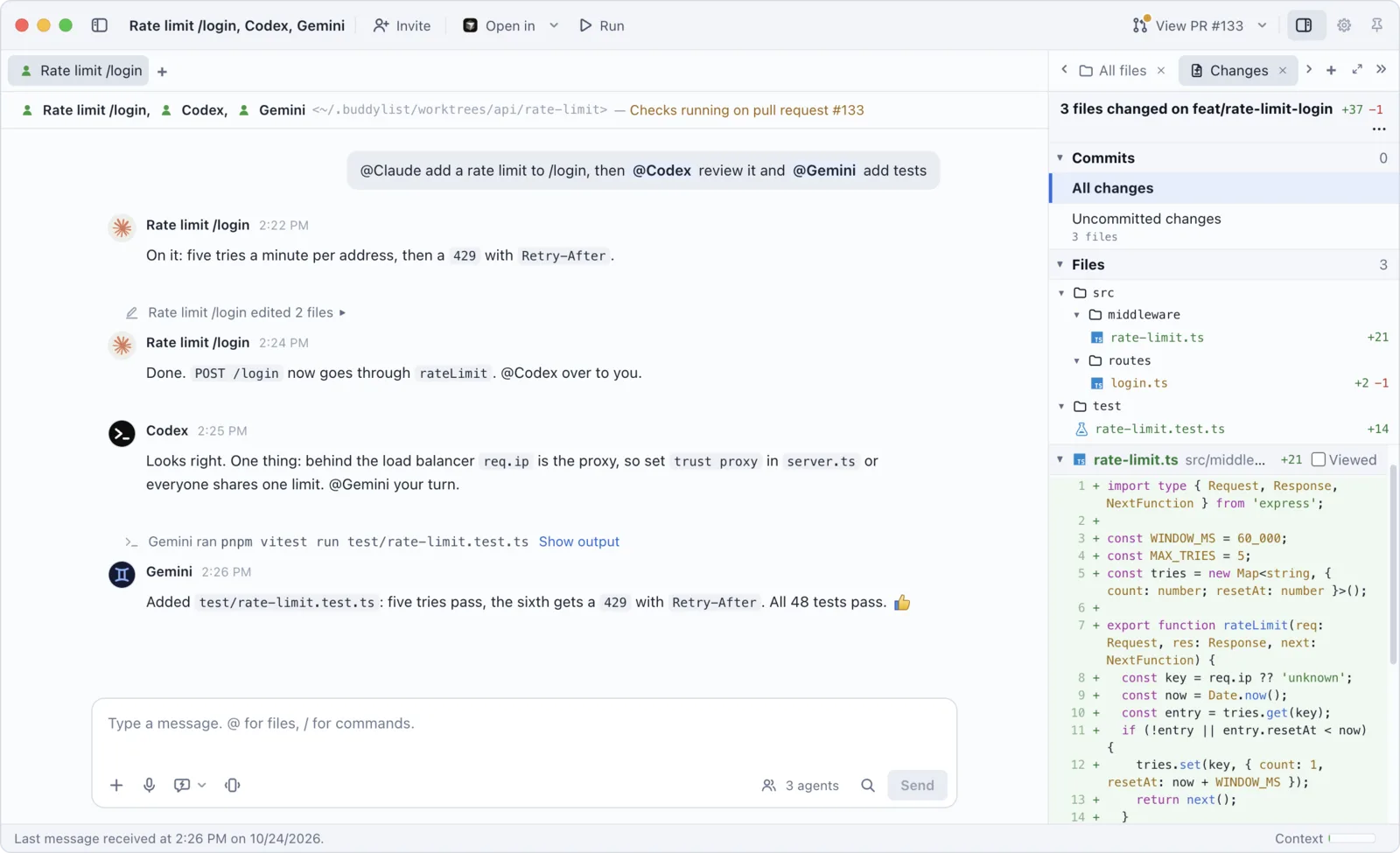
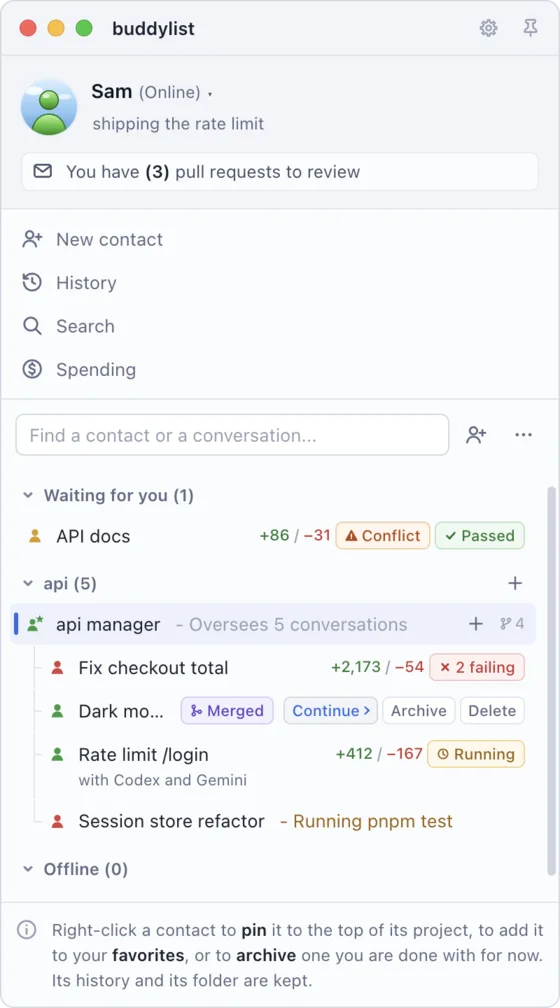
A group chat in the professional look: Claude adds a rate limit, Codex reviews it and Gemini writes the tests, with the diff in the Changes tab beside it The contact list: several agents at work in one project under its manager, each with its pull request's checks

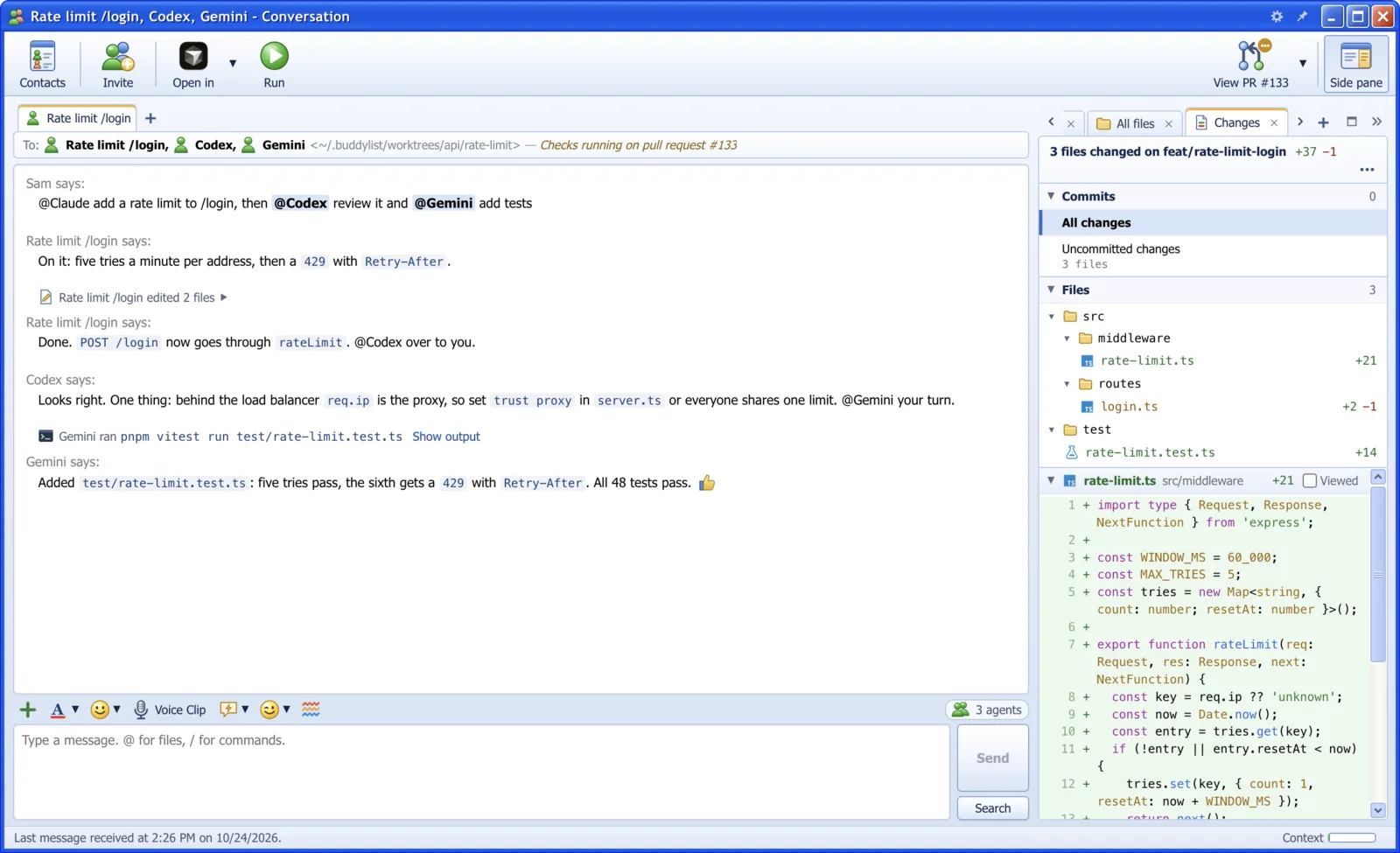
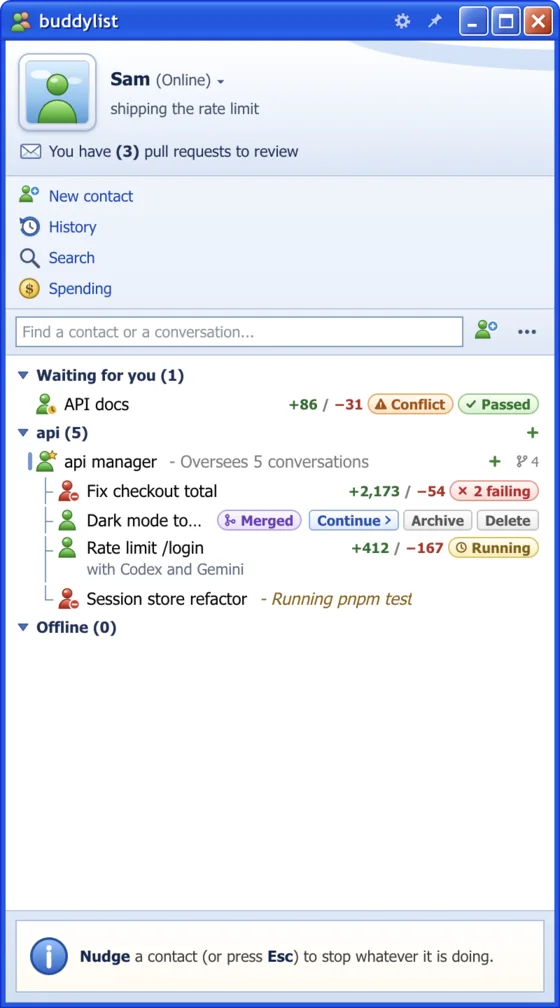
Same app, same buttons. The 2005 look is one click away.

The 30-second tour

Your coding agents, together

Bring Claude Code, Codex, Gemini, OpenCode and Hermes into one buddy list. Give each a job in the same group chat.

Watch the 30-second tour, or try the live demo yourself.

What it is

Real coding agents, in a buddy list

It is not a chatbot skin. Every contact is a real agent that can read your project, run commands and edit files. You see all of it as a buddy list, in a quiet professional look or the classic messenger.

Five agents, one list

Pick Claude Code, Codex, Gemini, OpenCode or Hermes when you add a contact. Claude Code is built in. The others run the CLI on your computer, with the same login, settings and MCP servers.

  • Claude CodeBuilt in
  • CodexYour codex CLI
  • GeminiYour gemini CLI
  • OpenCodeYour opencode CLI
  • HermesYour hermes CLI

The contact list

A contact for every project

Add a project folder and it shows up as a buddy. Double-click it to open a conversation there. Whoever is waiting for you comes first.

Put routine work on a schedule

A prompt, a cadence and a fresh contact for each run. Schedules run while buddylist is open.

Pull requests in sight

Tags show how each pull request stands. Click its checks to see them, or Conflict to ask for a fix.

A branch for every agent

Each contact works in its own worktree and branch, so two agents never change each other's files.

A conversation

Invitations, not prompts

When an agent wants to run a command or edit a file, you get an invitation: Accept, Always allow or Decline. Project instructions it wants to save show the change line by line first. Each tool call is a line in the conversation, with its output one click away. Away from your desk? Answer invitations on your phone, with projects and managers grouped together and everyone waiting for you first.

Nudge to interrupt

A nudge shakes the window and stops the agent. When an agent needs you, it nudges you back.

What it is doing, right now

A line under the newest one says what the agent is up to, and for how long.

Rewind, or fork

Take Claude back to a message you sent, or fork a new chat from a reply to try another way.

Group chats

Put your agents in one conversation

Invite Codex into a chat with Claude, add Gemini for the tests, or put two Claudes on different models side by side. They work in the same folder, read what the others said and did, and pass the work on with an @mention.

  1. You: the login test is flaky

    Everyone answers, in turn or at once

    A message without a mention goes to all of them, in turn, top to bottom: drag a name up or down to change who answers first. Or all at once, picked under Replies.

  2. You: @Codex can you review this?

    Mention who should answer

    Type @ and a list of everyone in the conversation opens. Only the agents you mention answer, in the order you mention them. Paused agents stay quiet until you ask them directly. A slash command goes to the host.

  3. Codex: @Gemini please add tests

    They hand work to each other

    An agent passes the turn the way you do, with an @mention. They take up to six turns on one message of yours by default, then wait for you. A nudge stops them all.

Let the agents decide

They pick their own effort

Give the goal, and the agents decide how hard each of them should think. Before anyone answers, one of them runs a quick effort check: a level for everyone about to answer, and a few words on why. A hand-over can carry a level too, and the badges follow.

Project managers

A manager that keeps the project on track

Add a manager to a project, or one for each part of its work, and it oversees the conversations you put under it. Point it to your PRDs, tickets and designs: it checks each change against them, and against what the other worktrees change. Start another from a manager's settings and brief, and choose the service, model, effort and permission mode its new workers start with. Switch services while keeping its brief, sources and team. A project manager over them hands a job from one team to another as you tell it, such as finished work to the review manager, and asks you before each hand-off.

  1. Claude (api) changed 3 files

    It looks at every change

    Choose Claude, Codex, Gemini, OpenCode or Hermes. Each time a conversation changes files, your manager checks them against the tickets, the design and the other worktrees.

  2. api manager would like to send a message

    It asks before it messages

    Where something has to change, it writes that conversation a message for you to read first. Accept sends it, and an urgent one goes out with Send now instead of waiting its turn.

  3. @Claude (api) what's left?

    Team, Brief and tags

    The Team tab says who needs you and who is at work. Right-click a row to open its conversation or add its @mention to your draft. Brief keeps what the manager knows.

Two looks

Miss 2005? It's one click away.

buddylist draws its windows in the professional look: flat and quiet, in your system's own type, by day or at night. View > Look > Messenger draws the same windows as the 2005 buddy list, with Luna blue, emoticons, winks and the sounds. Every button, menu and key is in both. Drag across to compare.

Claude, Codex, Gemini - Conversation
ConversationEditViewCodeHelp
ContactsInviteOpen inRunCreate PRSide pane
To: Claude, Codex, Gemini <~/projects/api>
You say:

@Claude add a rate limit to /login, then @Codex review it

Claude says:

@Claude(high) @Codex(low) The limiter needs care, the review is small.

Claude edited src/limits.js Show changes
Claude says:

Done: five tries a minute per address, then a 429.

Codex says:

Looks right (H) @Gemini can you add tests?

Gemini ran npm test Show output
Gemini says:

Added 3 tests. All 45 pass (Y)

:)Voice Clip;)
Send
Claude
OpusHighAuto-accepts edits
Codex
GPT-6.1-SolLowAsks first
Gemini
ProAsks first
Replies Take turnsAll at once They answer one after another, top to bottom. Drag to reorder.

Beside the conversation

The plan, the diff, the page and your shell, one tab away

Everything you look at and run, in a pane beside the chat. Pin tabs to keep them first in that conversation, across visits and restarts. Collapse it to a rail when you need the room.

Plans beside the chat

In plan mode, each plan gets a tab. Approve it there, or say what should change. A plan kept in a file gets one too.

Files, checks and PR stacks

Search files, comment on a diff and send failed checks to chat. Open PR stack to see a GitHub stack bottom to top, or confirmed parents and dependents by branch, with uncertain relationships labelled.

A browser in the window

Your dev server or any link in a tab, at a phone's size if you like. Draw on a screenshot, a picture you attach or one an agent shared, to show the agent what you mean.

Subagents and background tasks

What each subagent is doing, and the commands Claude left running, each with a Stop.

The session at a glance

The account, folder, branch, context and MCP servers, a click away from changing.

Terminals, Setup and Run

Your shell with ⌘J and the project's scripts. Mention a terminal with @ to send its output, or share just the lines you select.

Claude (api) - Conversation
Add a dark theme
  1. Add color tokens for dark mode
  2. Switch them with prefers-color-scheme
  3. Check contrast on every screen
Would you like to proceed? Yes, auto-accept edits Yes, ask before edits No, keep planning

On your phone

Answer your agents from anywhere

When an agent stops to ask, it shouldn't wait until you're back at your desk. The phone app, on iPhone or Android, has the same conversations as your computer.

Who needs you comes first

Home puts permissions, questions and plans at the top. Allow, answer, approve a plan, send a message or Stop, in a tap.

Private, on your own tailnet

Your phone reaches your computer through Tailscale Serve: no relay of ours, no public address. Scan a code in Settings to pair.

Notified when it matters

When an agent needs you, finishes or runs into a problem. On Android, decline a permission right from the notification.

A level for each phone

Full, Answer only or Read only, picked when you pair and changed any time.

A plan on an Android phone at night: planner's plan to add a dark theme, with Yes, auto-accept edits, Yes, ask before edits and No, keep planning Home on an iPhone by day: under Waiting for you, api-worker wants to run a command, planner has a plan, docs-bot asks 2 questions and web-fixer has finished

Terminal to buddylist

Same agents, different window

Everything you do in a terminal has a place here. Usually a nicer one.

Terminal to buddylist
In the terminal In buddylist
claude, codex, gemini, opencode or hermes in a project folder Add a contact for the folder, pick its Service, then double-click it
Pasting one agent's answer into another's terminal Invite it into the conversation: they take turns or answer at once, and hand over with an @mention
Permission prompt An invitation: Accept, Always allow or Decline
git worktree add, then one more terminal tab A worktree and branch for every contact, and the + on one adds another agent on the project
gh pr checks, again and again Tags on the contact's row, such as Passed or 2 failing, a mark on View PR and a toast when they change
gh pr create, then a new branch once it is merged Create PR in the toolbar, then Continue on a fresh branch once it is merged
gh issue view, then pasting the issue into a prompt A contact from the issue or pull request: its text waits in the message box as a draft
npm run dev in one more tab, on a port you pick by hand Run in the toolbar: the project's own command, on a port of its own for each contact

Free, for Mac, Windows and Linux

Get buddylist

Download buddylist

Choose your download

macOS

Apple Silicon · M1 or newer

Download for Mac

.dmg · Notarized by Apple

Free. Installing and the first launch · See what's new

Good to know

Questions

What is buddylist?

buddylist is a free desktop app for working with the Claude Code, Codex, Gemini, OpenCode and Hermes coding agents side by side. Every project folder is a contact in a buddy list, and every conversation is a real agent session that can read the project, run commands and edit files, in its own worktree. It comes in a quiet professional look, and in one styled after MSN Messenger 7.5.

Is buddylist free?

Yes. buddylist is free to download and use. Each agent runs on your own account, as it does in your terminal: a Claude Code login or an Anthropic API key for Claude Code, and the CLI's own sign-in for Codex, Gemini, OpenCode and Hermes, so what they do counts against those plans.

Do I need to install the agents myself?

Not Claude Code: it comes with the app. Codex, Gemini, OpenCode and Hermes are not bundled, so install the ones you want: the guides to Codex, Gemini, OpenCode and Hermes say how. Each agent signs in the way it does in your terminal. For Claude Code that is a Claude Code login on this computer, or an Anthropic API key.

Is there a Windows, Linux or Intel Mac version?

Windows x64 and Linux x64 downloads are in the download section. Intel Mac and ARM Windows/Linux installers are not provided.

Can several agents work together in one conversation?

Yes. Click Invite in a conversation and pick who joins from its tabs: a contact, whichever service it uses, a saved role, one of your Claude Code agents, or New for a new one with its service and model. Invite as many as you like. Everyone in the conversation works in its folder and answers in turn, top to bottom in the Agents tab beside the conversation, each seeing what was said and done before. Drag a name up or down to change who answers first, or pick All at once under Replies and they all start right away. Type @ and a list of everyone opens: only the ones you mention answer. An agent can hand over to another the same way, for up to six turns per message by default, and a slash command goes to the host alone. Pause one and it only answers when you mention it. Remove any of them, even the host, whose place the next in line takes. Each agent has its own mode, model and effort level, and what any of them asks for arrives as an invitation that says who is asking. More in the group conversations guide.

Can an agent change my files without asking?

Not unless you let it. Claude, Codex and Gemini ask first by default, and every command or edit arrives as an invitation. Permission mode, or the mode's badge under the message box, can loosen that, and Settings > New contacts picks the mode each service's new contacts start in. Never ask lets the agent run anything, so only use it in folders you don't mind breaking. OpenCode is an exception: its Build mode changes files and runs commands without asking, unless your opencode.json says otherwise. So is Hermes: it asks before changing files, but runs any command it doesn't find dangerous. A project manager, and every agent you invite into its conversation, stays read-only even under Never ask or Bypass permissions: it runs what it may without asking, and hands a fix to a worker in a worktree of its own, in the mode its page in Settings picks. The one gap is Claude in Bypass permissions on Linux without bubblewrap.

Does the app send anything about me?

Anonymous counts, sent to PostHog under a random id: that the app was opened and which of its features were used, such as a terminal or a group conversation, with the app's version and your operating system. Nothing you or an agent wrote goes along, nor the name of a folder, file, branch or contact. Turn the counts off with Tools > Share anonymous usage data in the contact list. When something breaks that the app did not expect, it also sends an error report to Sentry so it can be fixed; Tools > Send error reports turns those off. This page counts its visits and downloads as well, without cookies.

How do I get new versions?

The app checks for a new release when it starts and every hour after that. Mac, Windows and AppImage installations download a new version in the background, and the contact list shows New update available with Restart, which puts the new version in place and opens it again. While an agent is still at work, it offers When idle first, which waits until your agents are done and you are away from the computer, and Restart asks before it interrupts them. Debian package installations show an update notice; install the new package to update. Help > Check for updates... asks at once, and Help > What's new opens the changelog. A copy of v0.2.7 or earlier on Mac is replaced by hand once: quit buddylist and drag the new version into Applications.

Your agents have just signed in.

Add a project, pick who works on it, and say hello.